登录
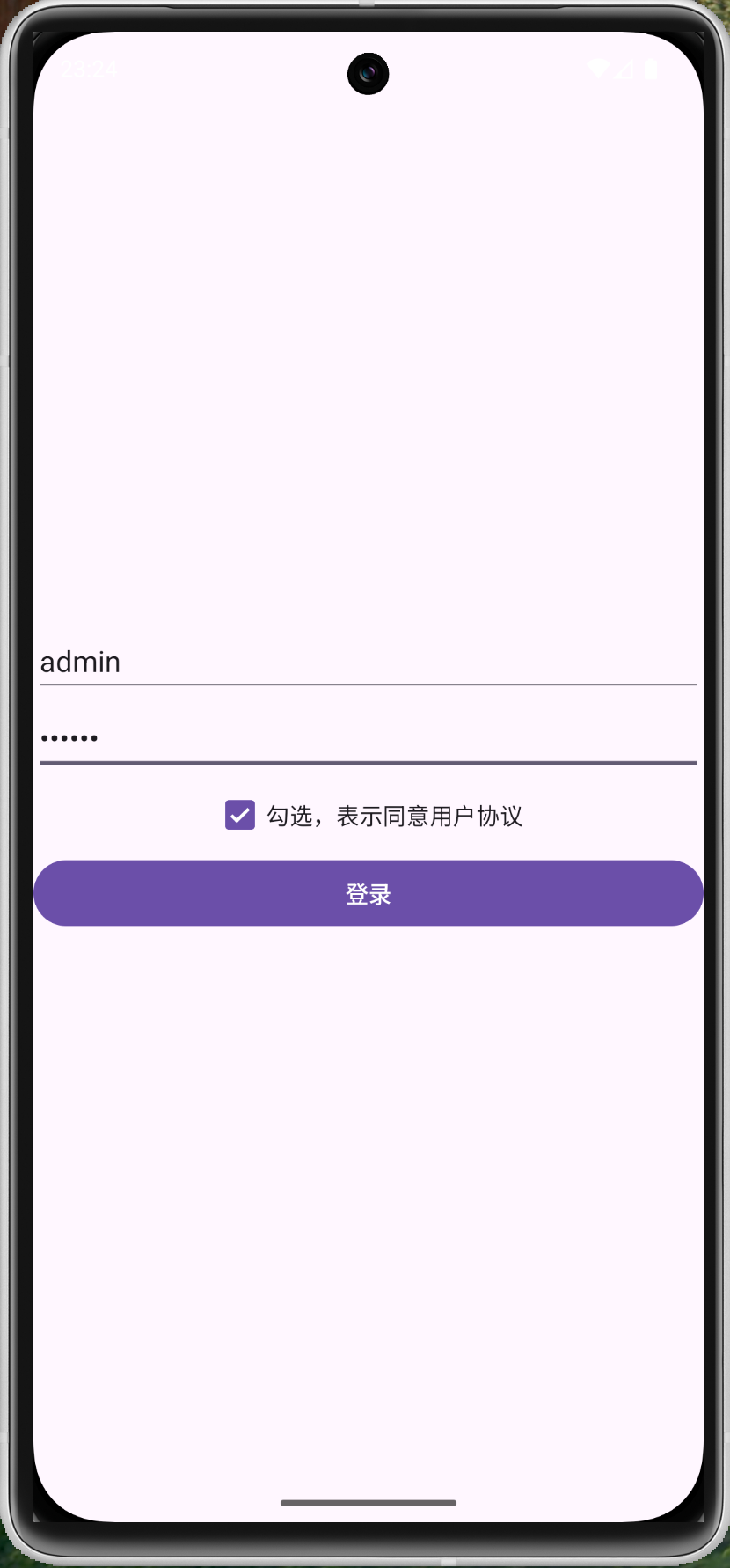
登录页面的 xml 布局文件面
<?xml version="1.0" encoding="utf-8"?>
<LinearLayout xmlns:android="http://schemas.android.com/apk/res/android"
    xmlns:tools="http://schemas.android.com/tools"
    android:layout_width="match_parent"
    android:layout_height="match_parent"
    android:gravity="center"
    android:orientation="vertical"
    tools:context=".MyCheckboxView">

    <com.google.android.material.textfield.TextInputEditText
        android:id="@+id/et_user_name"
        android:layout_width="match_parent"
        android:layout_height="wrap_content"
        android:autofillHints="username"
        android:hint="请输入用户名"
        android:maxLength="16"
        android:inputType="text" />

    <com.google.android.material.textfield.TextInputEditText
        android:id="@+id/et_password"
        android:layout_width="match_parent"
        android:layout_height="wrap_content"
        android:autofillHints="password"
        android:hint="请输入密码"
        android:maxLength="16"
        android:inputType="textPassword" />

    <CheckBox
        android:id="@+id/my_checkbox_view"
        android:layout_width="wrap_content"
        android:layout_height="wrap_content"
        android:checked="false"
        android:text="勾选,表示同意用户协议" />

    <Button
        android:id="@+id/login"
        android:layout_width="match_parent"
        android:layout_height="wrap_content"
        android:text="登录" />
</LinearLayout>
登录页面
package com.example.testjava1;

import android.os.Bundle;
import android.util.Log;
import android.view.View;
import android.widget.CheckBox;
import android.widget.EditText;
import android.widget.Toast;

import androidx.appcompat.app.AppCompatActivity;

public class MyCheckboxView extends AppCompatActivity {
    private static final String TAG = "MyCheckboxView";
    private EditText etUserName;
    private EditText etPassword;

    @Override
    protected void onCreate(Bundle savedInstanceState) {
        super.onCreate(savedInstanceState);

        setContentView(R.layout.activity_check_box_main);

        this.initialEditText();

        View button = findViewById(R.id.login);

        button.setOnClickListener(new View.OnClickListener() {
            @Override
            public void onClick(View v) {

                CheckBox checkBox = findViewById(R.id.my_checkbox_view);
                boolean isChecked = checkBox.isChecked();

                if (!isChecked) {
                    Toast toast = Toast.makeText(MyCheckboxView.this, "请先勾选用户协议", Toast.LENGTH_SHORT);
                    toast.show();
                    return;
                }

                String etUserName1 = etUserName.getText().toString().trim();
                String etPassword1 = etPassword.getText().toString().trim();

                if (!etUserName1.equals("admin") && !etPassword1.equals("123456")) {
                    Toast toast = Toast.makeText(MyCheckboxView.this, "用户名或密码错误", Toast.LENGTH_SHORT);
                    toast.show();
                    return;
                }

                Toast toast = Toast.makeText(MyCheckboxView.this, "登录成功", Toast.LENGTH_SHORT);
                toast.show();

                Log.e(TAG, etUserName1);
                Log.e(TAG, etPassword1);
            }
        });
    }

    private void initialEditText() {
        etUserName = findViewById(R.id.et_user_name);
        etPassword = findViewById(R.id.et_password);
    }
}
点击用户协议 xml 布局文件面
<?xml version="1.0" encoding="utf-8"?>
<LinearLayout xmlns:android="http://schemas.android.com/apk/res/android"
    xmlns:tools="http://schemas.android.com/tools"
    android:layout_width="match_parent"
    android:layout_height="match_parent"
    android:gravity="center"
    android:orientation="vertical"
    tools:context=".MyCheckboxView">

    <com.google.android.material.textfield.TextInputEditText
        android:id="@+id/et_user_name"
        android:layout_width="match_parent"
        android:layout_height="wrap_content"
        android:autofillHints="username"
        android:hint="请输入用户名"
        android:inputType="text"
        android:maxLength="16" />

    <com.google.android.material.textfield.TextInputEditText
        android:id="@+id/et_password"
        android:layout_width="match_parent"
        android:layout_height="wrap_content"
        android:autofillHints="password"
        android:hint="请输入密码"
        android:inputType="textPassword"
        android:maxLength="16" />

    <LinearLayout
        android:orientation="horizontal"
        android:layout_width="wrap_content"
        android:layout_height="wrap_content">

        <CheckBox
            android:id="@+id/my_checkbox_view"
            android:layout_width="wrap_content"
            android:layout_height="wrap_content"
            android:checked="false"
            android:text="勾选,表示同意" />

        <TextView
            android:layout_width="wrap_content"
            android:layout_height="wrap_content"
            android:text="《用户协议》"
            android:textSize="16sp" />
    </LinearLayout>

    <Button
        android:id="@+id/login"
        android:layout_width="match_parent"
        android:layout_height="wrap_content"
        android:text="登录" />
</LinearLayout>
点击用户协议 主页面
package com.example.testjava1;

import android.os.Bundle;
import android.text.SpannableString;
import android.text.Spanned;
import android.text.method.LinkMovementMethod;
import android.text.style.ClickableSpan;
import android.util.Log;
import android.view.View;
import android.widget.CheckBox;
import android.widget.EditText;
import android.widget.Toast;

import androidx.annotation.NonNull;
import androidx.appcompat.app.AppCompatActivity;

public class MyCheckboxView extends AppCompatActivity {
    private static final String TAG = "MyCheckboxView";
    private EditText etUserName;
    private EditText etPassword;


    @Override
    protected void onCreate(Bundle savedInstanceState) {
        super.onCreate(savedInstanceState);
        setContentView(R.layout.activity_check_box_main);


        CheckBox checkBox = findViewById(R.id.my_checkbox_view);
        initProtocolSpan(checkBox); // ✅ 初始化时就让“用户协议”可点击

        View button = findViewById(R.id.login);
        button.setOnClickListener(v -> {

            boolean isChecked = checkBox.isChecked();
            if (!isChecked) {
                Toast.makeText(MyCheckboxView.this, "请先勾选用户协议", Toast.LENGTH_SHORT).show();
                return;
            }

            String user = etUserName.getText().toString().trim();
            String pwd = etPassword.getText().toString().trim();

            // ✅ 逻辑修正:任意一个不匹配都算错误
            if (!"admin".equals(user) || !"123456".equals(pwd)) {
                Toast.makeText(MyCheckboxView.this, "用户名或密码错误", Toast.LENGTH_SHORT).show();
                return;
            }

            Toast.makeText(MyCheckboxView.this, "登录成功", Toast.LENGTH_SHORT).show();
            Log.e(TAG, user);
            Log.e(TAG, pwd);
        });
    }

    private void initProtocolSpan(CheckBox checkBox) {
        String text = checkBox.getText().toString();
        SpannableString ss = new SpannableString(text);

        String key = "用户协议";
        int start = text.indexOf(key);
        if (start < 0) return; // 找不到就不设置,避免崩溃
        int end = start + key.length();

        ClickableSpan clickableSpan = new ClickableSpan() {
            @Override
            public void onClick(@NonNull View widget) {
                Toast.makeText(MyCheckboxView.this, "打开了用户协议", Toast.LENGTH_SHORT).show();
            }
        };

        ss.setSpan(clickableSpan, start, end, Spanned.SPAN_EXCLUSIVE_EXCLUSIVE);
        checkBox.setText(ss);

        // ✅ 允许点击
        checkBox.setMovementMethod(LinkMovementMethod.getInstance());

        // ✅ 可选:去掉点击时的黄色背景(更像“链接”)
        checkBox.setHighlightColor(0x00000000);
    }

}